FOR RESTAURANTS, CAFÉS AND GROWING VENUES
Your menu, always up to date.
Create an Arabic and English QR menu, update prices and availability from one dashboard, and share it with your customers. Add items yourself, import a spreadsheet, or connect your AI assistant.
- No card needed
- Arabic + English
- AI is optional
- Table QR codes
GUEST MENU · LIVE PREVIEW
From your first item to your first scan.
- 01
Add your menu
Type your items, upload a CSV or JSON file, or connect an AI assistant. Start with the method that suits you.
- 02
Review and make it yours
Check prices, translations and food information. Choose your layout and preview what guests will see.
- 03
Publish and share
Publish your menu, download your table QR codes and share your link. Return to the dashboard whenever something changes.
Start with whatever you have — even a paper menu.
Photograph your old menu.
Connect a supported AI assistant, then share your menu photo, PDF or source material. Review the imported names, prices, translations, calorie estimates and allergen information before publishing. Your assistant may require its own subscription.
Create account for AI importPaste or upload a spreadsheet.
CSV or JSON from your POS or a competitor export. Mapped and validated, nothing guessed.
Create account to uploadAdd your items yourself.
Start with an empty menu. Add sections, prices and item details, then preview before publishing.
Create account to add itemsYOUR EVERYDAY WORKSPACE
A menu you can actually manage.
Your guest menu and your owner dashboard work together. Here is what you can do after your first QR code is printed.
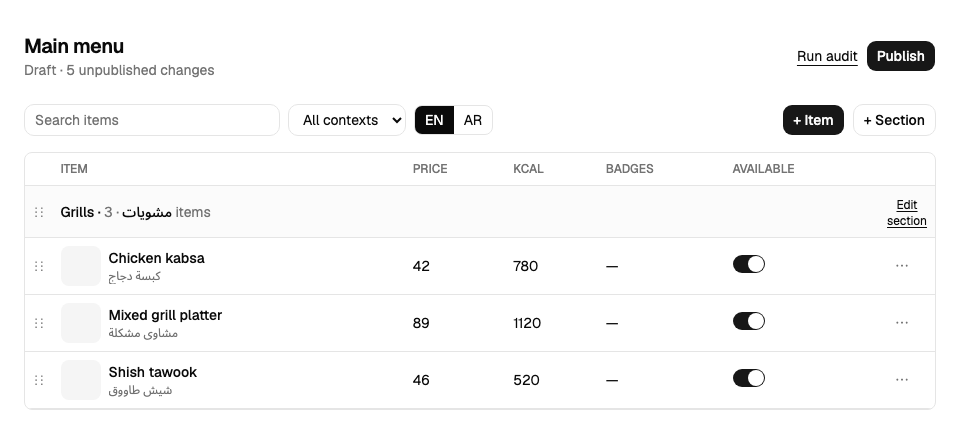
Prices and item details
Edit your draft, review the changes, then publish when you are ready.
Availability and offers
Mark an item sold out and manage offers without replacing the table QR.
Visits and popular items
Use analytics to see scans and item interest. History depends on your plan.
TEMPLATES
Five layouts. Your brand. Any menu size.
More tools for the same venue.
Start with your menu. Set up the other tools when your team needs them.
POS
Connect a register to the same venue. Owner setup, device enrollment and fiscal configuration are required.
See setup requirementsBookings
Set up services, resources and availability. Payment and messaging features depend on connected providers.
See setup requirementsPickup
Offer WhatsApp, phone or an ordering-site link. Direct-to-register pickup is not available yet.
See setup requirementsONE VENUE · ONE FULL YEAR
Paid features. Your first year free.
Get all Qaema software features for one venue, including POS, unlimited menu items, every template, analytics and bookings. One offer per account.
For Free accounts with exactly one active venue. Request before starting a trial or buying a plan. Our team checks eligibility and activates the offer manually; signing up alone does not activate it.
The year starts when activated. No card required and no automatic charge. At the annual review, our team handles the end of the offer; continuing on a paid plan is your choice.
Additional venues, hardware, payment processing and third-party services are not included. Product setup and provider availability still apply.
PRICING · YEAR
Free to go live. Choose the features you need.
Free
0
Get the menu live.
- 1 venue · 50 items
- Agent import (MCP)
- Arabic + English
- Badges & offers
- Table QR codes
- 7-day analytics
- Qaema badge on menu
Pro
990
990 yearly. Your brand, your domain.
- Unlimited items, no platform badge
- All 5 templates, brand kit & font pairs
- Custom domain
- Pickup mode + delivery list
- Order list + WhatsApp
- Availability API
- 2 seats · 12-month analytics
Business
2,490
2,490 yearly. Several branches.
- 3 venues
- 10 seats
- Everything in Pro
- 12-month analytics
Prices exclude VAT, added for your billing country. Billed in SAR via mada, Apple Pay or card. Annual subscriptions only, paid once and renewed manually. Your menu stays online on Free after expiry.
Compare plans and offer termsMade for your guests, in Arabic and English.
SFDA
Calories on every item.
Record calories and review any AI estimates before publishing. Your venue is responsible for confirming its menu information.
14 ALLERGENS
Help guests explore their options.
Allergen filters use reviewed venue information, exclude cross-contact warnings and unknown data, and remind diners to confirm with staff.
AR · EN · RTL
Bilingual by default.
Real right-to-left layout, Arabic-Indic numerals, curated Arabic + Latin font pairs. Translated at import.
VAT 15%
Prices that add up.
Inclusive pricing, running totals, WhatsApp pickup orders. Payments only when you ask for them.
An optional assistant for repetitive work.
Ask a connected assistant to prepare menu updates or translations, then review the results. You can always work directly in the dashboard.
Read the agent docsBefore you get started
Do I need an AI subscription?
No AI assistant is required to use Qaema. Add items yourself or import a spreadsheet. If you choose AI import, your assistant’s own access and subscription requirements apply.
Can I change the menu after printing my QR codes?
Yes. Publish your menu changes and keep using the same menu link and table QR codes.
Are calories and allergens verified automatically?
No. Review and confirm food information before publishing. AI estimates are not a substitute for your venue’s verified information.
How do I get the free year?
Create a Free account with one venue and request the offer before starting a trial or paying. The team confirms eligibility and activates it manually.
What happens after the offer?
There is no automatic charge. Staff review and end the offer manually. You can choose a paid plan; otherwise the underlying plan applies and your content is preserved.
Ready to put your menu to work?
Create your account, add your menu and review it before going live. No card needed to start.